Mobile App Security: Best Practices for Secure App Development
Mobile apps now handle everything from banking and healthcare to shopping and entertainment, which makes them a prime target for attackers. As mobile app development trends increase with more features, more integrations, and more user data, the security risks grow rapidly. For U.S. businesses, a single breach can lead to legal penalties, lost customers, and long-term damage to brand trust.
Whether you run a startup or an enterprise, this guide covers mobile app security best practices, from threats and compliance rules to security testing. It also explains how to build mobile application security into every stage of the lifecycle, compare platforms, and choose a development partner for future growth.
Why Does Mobile App Security Matter for U.S. Businesses?
US businesses invest in secure mobile app development to prevent vulnerabilities that can expose customer data, trigger legal penalties, and damage trust. To build a mobile application with secure strategies, product teams must know various threats, breach costs, and compliance rules.
Common Mobile App Threats
Attackers target several mobile app weaknesses to collect user information and make unauthorized changes. Teams must know these potential security threats to fix them by following the right strategy.
-
Insecure data storage
Apps often save passwords, tokens, or personal data on the device in plain text, where other apps or attackers can read it. A lost, stolen, or rooted phone can turn that unprotected data into an easy breach.
-
Weak authentication
Simple passwords, missing multi-factor authentication, and long-lived session tokens make it easy for attackers to take over accounts. Once inside, they can access sensitive data and perform actions as the real user.
-
Vulnerable APIs
Mobile apps depend on APIs to talk to backend servers, and poorly secured endpoints can expose data to anyone who calls them. Missing authorization checks, weak input validation, and no rate limiting increase mobile app vulnerabilities.
-
Third-party SDKs
Analytics, advertising, and payment SDKs add useful features, but they also bring code your team did not write or fully review. An outdated or compromised SDK can leak user data or open a back door into your app.
The Business Cost of a Security Breach
A single data breach in the U.S. costs an all-time high average of $11.5 million, according to the IBM Cost of a Data Breach Report 2026. Vulnerabilities in mobile app development expose consumer data, triggering regulatory fines, operational downtime, and customer churn, which account for nearly two-thirds of total breach expenses.
The average breach lifecycle has stretched to 247 days to identify weak mobile endpoints. Furthermore, 62% of organizations suffered a mobile app security incident annually, pushing the average cost of a mobile-specific breach to $6.99 million, according to the Guardsquare Mobile App Security Survey.
USA Compliance Requirements to Know
Mobile app compliance rules depend on your industry, your users’ location, and the data your mobile app handles. The following table discusses 10 major compliance and regulatory laws that every US business must know.
| Requirement | Type | Description |
| HIPAA | Federal law | Protects patient health information handled by healthcare apps and partners. |
| PCI DSS | Industry standard | Sets security rules for apps that handle payment card data. |
| CCPA/CPRA | California state law | Gives California users control over personal data collection and sharing. |
| GLBA | Federal law | Requires financial apps to safeguard customers’ private financial information. |
| COPPA | Federal law | Restricts data collection from children under 13 without parental consent. |
| FTC Act (Section 5) | Federal law | Prohibits deceptive or unfair practices, including inadequate app data protection. |
| State Breach Notification Laws | State laws | Require prompt notice to affected users after a data breach. |
| NYDFS 23 NYCRR 500 | New York regulation | Mandates cybersecurity programs, encryption, and breach reporting for financial firms. |
| SOC 2 | Voluntary audit standard | Audit framework verifying a provider’s security, availability, and confidentiality controls. |
| NIST Cybersecurity Framework | Voluntary framework | Voluntary framework for managing and reducing cybersecurity risk across organizations. |
Mobile App Security Best Practices
From writing secure code and strong authentication to keeping apps updated after launch, we will discover key mobile app security best practices. They form a practical foundation that production teams can adapt these practices to each app’s risk level, architecture, and data.
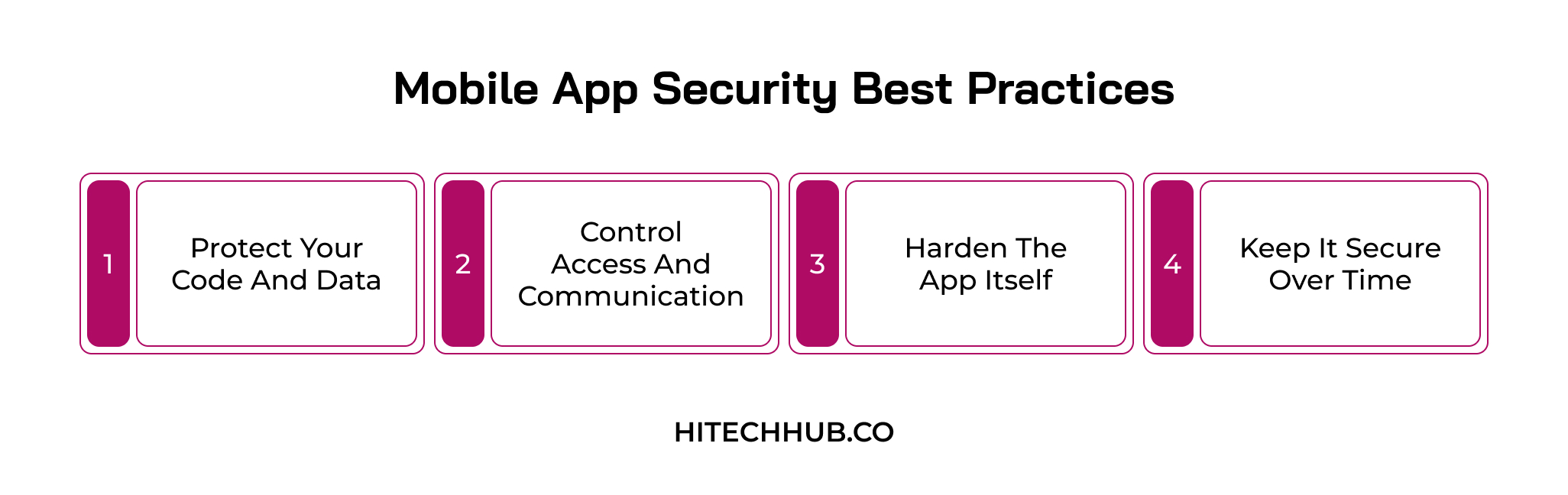
1. Protect Your Code and Data
-
Follow Secure Coding Practices
Secure coding practices mean writing code that resists attacks from the start, including validating all inputs and handling errors safely. Never hardcode API keys or passwords in the app, since attackers can extract them from the package. Use the OWASP Mobile Application Security Verification Standard (MASVS) as your coding checklist.
-
Encrypt Sensitive Data Everywhere
Encrypt data both at rest and in transit using strong algorithms, protocol configuration, modes, and key management. On Android app development projects, keys are stored in the Android Keystore. For iOS applications, it is crucial to rely on the Keychain and Secure Enclave, avoiding transfer of encryption keys inside the app.
-
Minimize Data Stored on Device
The less data an app keeps locally, the less there is to steal if a phone is lost or compromised. Collect only what each feature truly needs, and keep sensitive records on the server whenever required. It is important to clear caches and logs after sessions, but apps cannot reliably wipe clipboards everywhere, and clearing everything may break functionality.
2. Control Access and Communication
-
Use Strong Authentication Controls
Weak logins are a top cause of account takeover, so require multi-factor mobile app authentication for sensitive actions. Add biometric options and short-lived session tokens, and apply role-based access so users only reach what they need. Always ask users to verify identity again before payments, password resets, or profile changes.
-
Secure Your APIs and Backend
Every API endpoint should authenticate and authorize each request on the server and must not depend on the application framework. Add rate limiting, strict input validation, and an API gateway to block SQL injection attacks. To ensure API security for mobile apps, it is crucial to keep tokens out of the app package and rotate them regularly.
-
Enforce Secure Network Communication
Force all traffic through HTTPS with TLS 1.2 or higher, and block cleartext connections completely. Reject invalid certificates and retire outdated protocols like SSL to stop man-in-the-middle attacks on public Wi-Fi. Consider certificate pinning for high-risk apps, with a rotation plan, so updates do not lock users out.
3. Harden the App Itself
-
Vet Third-Party Libraries Carefully
Third-party libraries and SDKs speed up development, but they also bring redundant code. Choose actively maintained packages, scan dependencies for known vulnerabilities, and remove unused channels. Keep a full inventory of dependencies for both Android and iOS app development and review SDK data collection before every release.
-
Defend Against Reverse Engineering
Attackers can decompile apps to study logic, steal secrets, or repackage malicious copies. Obfuscation, integrity checks, and runtime protection identify tampering, rooting, and debugging but cannot detect everything. OWASP MASVS includes a dedicated resilience area for these controls, though no protection is unbreakable, only costlier to defeat.
4. Keep It Secure Over Time
-
Run Regular Security Testing
Combine static analysis, dynamic analysis, and mobile app penetration testing to find various system errors. Test on real devices, including rooted and jailbroken ones, to see how the app behaves under attack. Schedule full tests at least once a year and after major changes in an architecture or feature.
-
Patch and Update Regularly
New vulnerabilities appear constantly in operating systems, frameworks, and libraries, so outdated apps become easy targets. Update dependencies on a fixed schedule, target current SDK versions, and set minimum supported OS versions. A forced-update option speeds critical security fixes, though offline or inactive users may still lag.
Building Security into the App Development Lifecycle
It is better to start mobile application security at the design stage and maintain it after launch, as it is crucial to prevent attacks. Integrating it in every stage helps teams to catch flaws early, report errors, choose the right strategy, and fix them in a timely manner.
Threat Modeling at the Design Stage
Mobile app threat modeling helps to detect target areas where malware can attack before writing any code. Fixing these issues at the design stage helps enterprises to cut costs, as it may increase at the launch phase.
- Identify Assets and Entry Points: List what attackers would want, such as user data, tokens, and payment details. Then map every way into the app, including APIs, login screens, and third-party SDKs.
- Map Threats with a Framework: Use a method like STRIDE to ask how each entry point could be abused. This turns guesswork into a repeatable review that any team can follow.
- Prioritize Risks and Plan Fixes: Rank threats by likelihood and business impact, then assign controls and owners to each one. Focus first on high-risk items, such as data exposure and account takeover.
Security Testing Methods Explained
Several security methods combine with effective mobile app testing because it is difficult for a single approach to catch every flaw. The following table describes top mobile app security testing strategies and when to use them.
| Testing Method | Description | Best Used |
| Static Application Security Testing (SAST) | Scans source code for vulnerabilities before the app is run. | During coding and every commit |
| Dynamic Application Security Testing (DAST) | Tests the running app to find vulnerabilities attackers could exploit. | On test builds before release |
| Interactive Application Security Testing (IAST) | Monitors running code during testing to pinpoint flaws instantly. | During QA and staging |
| Software Composition Analysis (SCA) | Checks third-party libraries and SDKs for known security vulnerabilities. | Every build and dependency update |
| Penetration Testing | Ethical hackers simulate real attacks to uncover exploitable weaknesses. | Before launch and at least annually |
| API Security Testing | Validates authentication, authorization, and input handling on backend endpoints. | After every backend or API change |
| Reverse Engineering and Tamper Testing | Checks whether attackers can decompile, modify, or repackage the app. | Before release, especially finance and health apps |
Post-Launch Monitoring and Incident Response
After mobile app launch, multiple threats can evolve, so continuous monitoring and dedicated teams are required. Production teams reduce risk through prompt patches and rapid response when vulnerabilities emerge.
-
Releasing patches quickly
Attackers often exploit known vulnerabilities within days of disclosure, so slow fixes leave users exposed. Many businesses hire dedicated development teams to keep a steady patch cycle, plus a forced-update option for critical fixes.
-
Having a breach response plan
A written plan outlines investigation steps, response team roles, and communication and recovery procedures. Practicing it before an incident helps teams meet breach notification deadlines and limit damage during secure app development.
Platform-Specific Mobile App Security Considerations
Mobile app security best practices are applicable to various operating systems and frameworks, which have their own security strengths and weak points. We have discussed different OS versions and app development models so you can choose the right approach and apply them seamlessly.
1. Android vs. iOS Security
Android app security is different from iOS based on keychain storage, app distribution, and OS updates. Here, 5 major parameters are discussed that affect the security approach of a business investor.
| Parameter | Android | iOS |
| Secure Storage | Android Keystore protects cryptographic keys inside hardware-backed secure storage. | Keychain and Secure Enclave protect credentials, keys, and biometric data. |
| App Permissions | Users grant runtime permissions, but broad requests increase attack surface. | Granular permission prompts give users tight control over data access. |
| App Distribution | Sideloading and third-party app stores raise malware and tampering risk. | Apple’s App Store review and code signing restrict unvetted installs. |
| OS Update Adoption | Device fragmentation means many users run outdated, unpatched Android versions. | Most users update quickly, so fewer outdated versions need support. |
| Common Risk Areas | Exported components, insecure intents, and rooted devices need close testing. | Jailbreaks, insecure URL schemes, and weak Keychain settings need testing. |
2. Cross-Platform App Security
Frameworks like Flutter and React Native allow teams to easily share one codebase across platforms. However, plugin vulnerabilities and inconsistent platform-specific security controls can still introduce risks if not managed carefully.
- Vet Plugins and Packages: One vulnerable or abandoned plugin can expose both platforms at once. Check maintainers, update history, and scan dependencies before adding them.
- Use Native Secure Storage: Shared code often stores data unencrypted by default. Use Android Keystore and iOS Keychain, through trusted libraries, for tokens and credentials.
- Protect the Shared Codebase: JavaScript and Dart bundles can be extracted and read if left unprotected. Apply obfuscation and keep API keys and secrets out of the app package.
- Keep Controls Consistent Across Platforms: A security feature may work on one platform but fail on the other. Test permissions, biometrics, and certificate checks on both Android and iOS.
- Secure the Native Bridge: Weak bridges between shared code and native modules can leak data. Validate everything crossing the bridge and limit which native functions are exposed.
3. Native vs. Hybrid Security
The choice between native or hybrid development can affect your defense strategies, dependencies, and patching speed. Whether you invest in iOS app security or combine it with cross-platform methods, knowing the following parameters is beneficial.
| Parameter | Native | Hybrid |
| Platform Security APIs | Direct access to Keystore, Keychain, and biometric APIs without wrappers. | Plugins bridge to native security features, adding potential weak points. |
| Third-Party Dependencies | Fewer external packages generally keep the dependency attack surface smaller. | Heavy reliance on community packages increases supply chain risk. |
| Code Exposure | Compiled binaries are harder to read, though still reversible. | Script-based code can be easier to inspect, so obfuscation matters. |
| Patch Delivery | Fixes ship through standard store updates for each platform separately. | One shared codebase lets teams patch both platforms together faster. |
| Security Testing Effort | Platform-specific tests are needed, but tools and guidance are mature. | Requires testing both the shared layer and each native bridge. |
How to Choose a Secure Mobile App Development Partner?
Without the right skills and processes, a team may struggle to implement a secure mobile app development plan. Whether you are a startup or a large enterprise, it is crucial to ask various questions and evaluate the strategies to protect your app, users, and reputation.
Questions to Ask Before You Hire
Before you hire any app development companies in the USA, it is crucial to ask about their security standards, testing process, and incident-response practices. It is necessary to get a mobile app security checklist from the team to ensure that their methods and approaches are legal.
- Which security standards and certifications do you follow?
Look for OWASP MASVS (Mobile Application Security Verification Standard) alignment and certifications like SOC 2 or ISO 27001.
- How do you protect our data and source code during development?
A good partner uses access controls, encrypted repositories, and signed NDAs, and avoids storing secrets in shared code wherever possible.
- Do you have experience with compliance rules like HIPAA, PCI DSS, or CCPA?
They should name past projects in regulated industries and explain how they met each requirement.
- What is your process for fixing vulnerabilities after launch?
Expect a clear patch timeline, ongoing monitoring, and a defined incident response plan, not just a one-time handover.
Testing and code review process
For secure app development, testing strategies should match industry standards and include code review. You must know the frequency of app testing, the tools used, and the experts reviewing the code for future changes.
- Automated Security Scans: A reliable partner runs SAST and dependency scans. This catches common flaws early and keeps vulnerable libraries from reaching your production app.
- Peer Code Reviews: Every code change should be reviewed against a security checklist. Ask whether reviewers check for weak authentication and unsafe data handling before approving.
- Independent Penetration Testing: Ask whether an independent provider conducts penetration testing before launch, and request a report summarizing findings, severity, remediation, and retesting.
Conclusion
Mobile app security is not a one-time task, but it is a continuous process that starts at the design stage, continues through testing, and lasts long after launch. By following these mobile app security best practices, businesses can meet various U.S. compliance requirements.
It is crucial to choose a partner who ensures mobile application security, so you can protect your users and overall brand reputation. Businesses can find an agency on Hitech Hub to get expert help in mobile app encryption and building secure and reliable solutions.
Frequently Asked Questions
-
What are the most important mobile app security best practices?
Some of the major best practices for mobile application security include secure coding, data protection, network security, and runtime defense. Experts use encryption standards like AES-256 and communication protocols such as TLS 1.2 for security. Various authentication and third-party testing methods are also used to prevent system breaches.
-
Which USA laws and regulations apply to mobile app security?
In the USA, the security and privacy of mobile applications are governed by multiple accountability laws. Some of the major USA app security regulations are discussed as follows:
Federal sector-specific laws: These include HIPAA for protected healthcare data, COPPA for children’s privacy, GLBA for fintech apps, and FERPA for student data.
State-level data privacy laws: CCPA for consumer privacy in California, VCDPA in Virginia, and CPA in Colorado for security safeguards.
Federal government & enterprise standards: FISMA ensures security management, and NIST guidelines provide voluntary frameworks for mobile devices and apps.
-
How much does mobile app security testing cost in the USA?
The total cost of mobile app security depends on the complexity level, the number of platforms, and the addition of backend APIs. In the USA, the cost ranges from $5,000 to $35,000 per assessment based on the app ecosystem and AI integration. Businesses can choose between a per-engagement model and penetration testing as a service (PTaaS) according to their needs.
-
Are iOS apps more secure than Android apps?
iOS app security is higher than Android due to Apple’s controlled ecosystem, strict app review policies, and uniform hardware-software integration. Android competes with iOS based on flagship parity, customization, and privacy controls. Most malware and trojans target Android because of its massive global market share and the openness of its software environment.

Eshika Jain
21-October-2026
Top Categories

NEED HELP SELECTING A COMPANY?
With the fast-paced world of web development today, keeping pace.
Connect With Us