How to Build an AI App in 2026: Features, Process, Cost & Examples
When you open apps on a device, you notice most of them are able to anticipate your next move, from song suggestions to route recommendations. The integration of mobile app development with AI is offering smart and personalized behavior and shaping users’ judgment of every new product.
For businesses, the question is no longer whether to add AI, but how to build an AI app without wasting budget or time. This guide answers various questions with clear definitions and facts.
It covers essential features, the step-by-step development process, the right tech stack, realistic cost ranges, and real-world examples across various industries. The blog also outlines challenges in AI app development for startups and how to choose a reliable partner so you can plan with confidence.
What is an AI-powered mobile app?
AI-enabled mobile apps use machine learning, NLP, genAI, and other technologies to learn from data, recognize patterns, and adapt to user needs.
This AI integration in mobile apps is enhancing multiple industries like healthcare, fintech, and logistics across the globe. These platforms offer personalization, LLMs, predictive analytics, and computer vision solutions.
-
How Do AI Apps Differ from Traditional Mobile Apps?
Innovative mobile app development trends power modern-day applications through AI, machine learning, and other technologies. The following table provides key differences between the old and AI-driven mobile apps based on 5 crucial parameters.
| Parameter | Traditional Mobile Apps | AI-Powered Mobile Apps |
| Personalization | Shows the same content and layout to every user | Adapts content, layout, and offers based on individual user behavior |
| Decision-Making | Follows fixed rules and logic programmed by developers in advance | Uses models to generate prediction data, while app logic can still govern decisions |
| Learning Ability | Stays static until developers manually release a new version | Can be retrained using new data and feedback, depending on how the system is designed |
| User Interaction | Relies on taps, menus, and manual typing for every action | Supports voice, chat, camera, and natural language for smarter interactions |
| Maintenance | Needs mainly bug fixes, feature updates, and compatibility upgrades | Requires ongoing model monitoring, retraining, and data quality management |
Must-Have Features of an AI-Powered Mobile App
Most AI mobile app features include personalization, chatbots, predictive analytics, smart search, and fraud detection. In this section, we will cover various features one by one, describing their real-time capabilities.
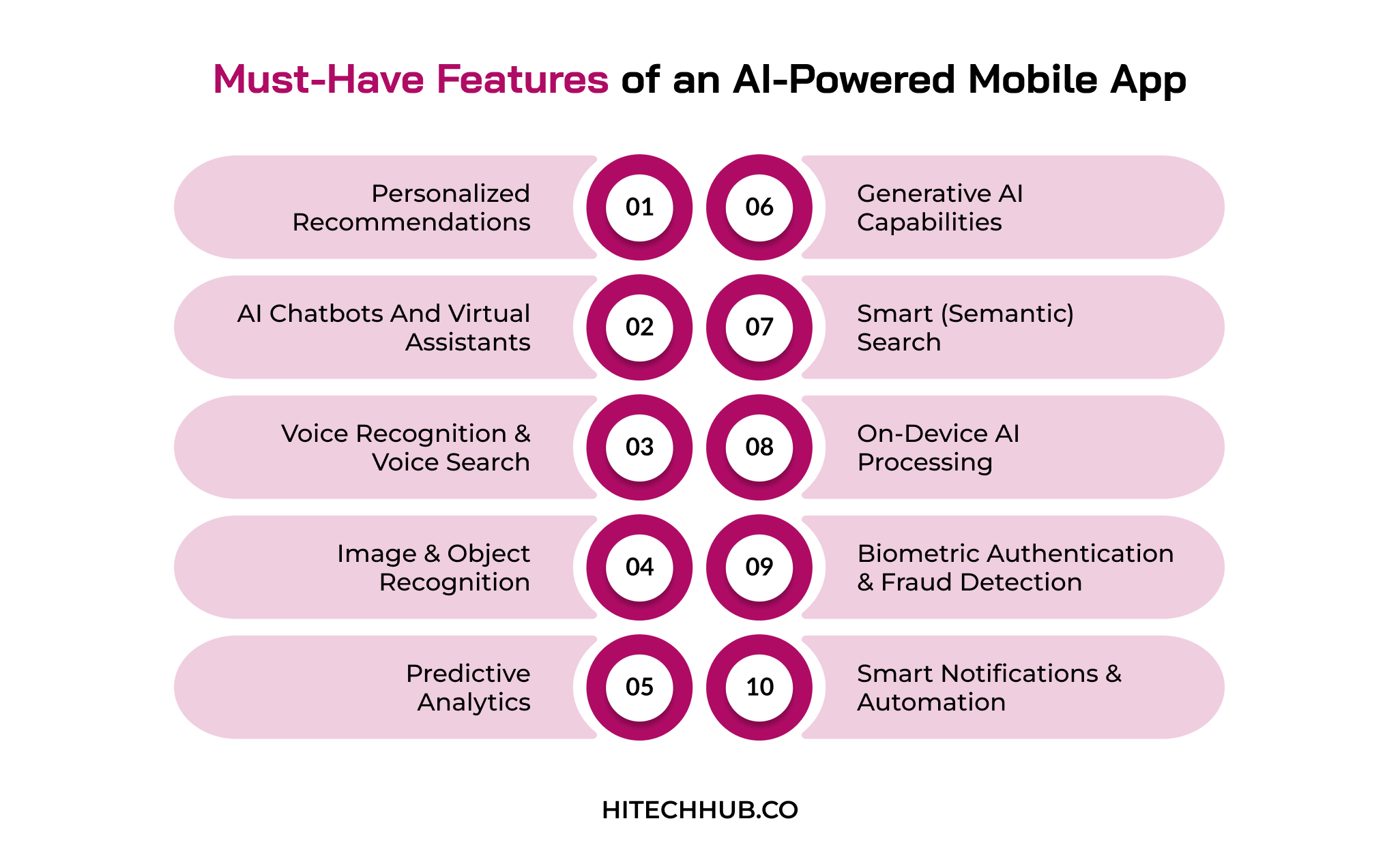
1. Personalized Recommendations
The app can analyze user actions, like clicks and transactions, to recommend items of interest. It may increase overall user interaction, conversions, and retention, depending on user behaviour.
2. AI Chatbots and Virtual Assistants
Chatbots trained on NLP capabilities can quickly and easily respond to questions and requests using natural speech. This delivers instant 24/7 customer support while reducing manual errors and recurring expenses.
3. Voice Recognition and Voice Search
Users can speak commands or search queries instead of typing, and the app converts speech into actions. This improves accessibility for customers and provides comfortable usage.
4. Image and Object Recognition
Computer vision helps to identify various objects, text, and faces through the phone camera. This use of AI in mobile apps enables visual search, document scanning, and augmented reality experiences.
5. Predictive Analytics
Various machine learning models analyze past data to forecast user needs, demand, or risks. This enables proactive features like ETA prediction and churn alerts.
6. Generative AI Capabilities
Large language models generate text, images, summaries, or code directly inside the app. This powers writing assistants, tutoring tools, and instant content creation.
7. Smart (Semantic) Search
Instead of matching exact keywords, the app understands user intent and context. This delivers accurate results even for vague queries and reduces search drop-offs for businesses.
8. On-Device AI Processing
AI models run directly on the device using advanced tools like Core ML or TensorFlow Lite. This may allow mobile or web apps to deliver faster responses, offline access, and stronger privacy for users.
9. Biometric Authentication and Fraud Detection
Face or fingerprint recognition confirms a user’s identity, whereas anomaly detection observes suspicious behavior. This feature is used to protect various payments and data in real time.
10. Smart Notifications and Automation
AI determines the type of data, target user, and timeline for sending information based on behavior. It benefits the brand with higher open rates and lower uninstallation rates due to irrelevant alerts.
Step-by-Step Process to Build an AI-Powered Mobile App
To build an AI-powered mobile app, experts follow a dedicated process, from identifying use cases to market launch and maintenance. This section provides key development stages that address businesses across various industries.
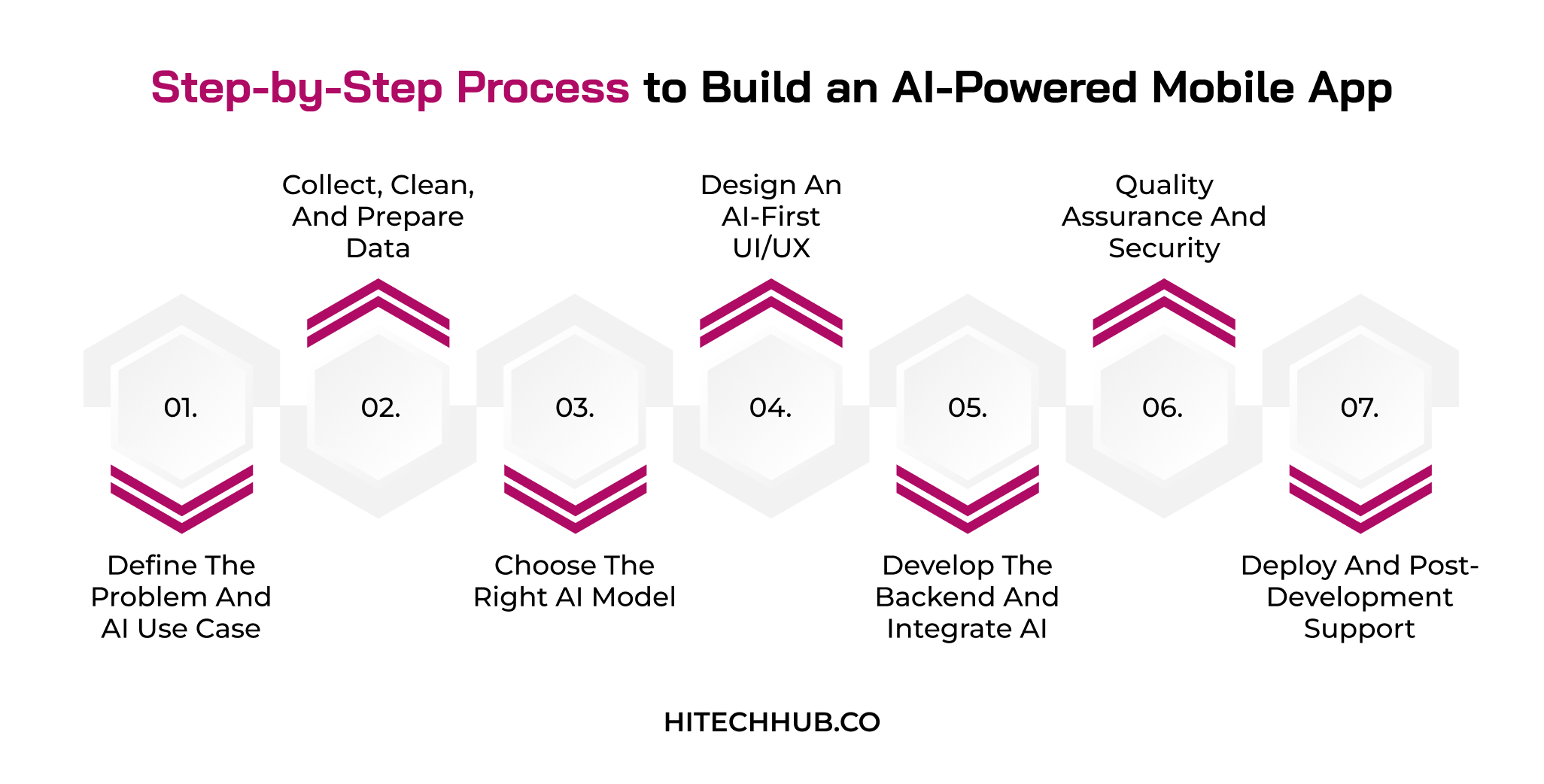
1. Define the Problem and AI Use Case
Businesses should identify specific user problems that AI can solve better than standard logic, such as personalization or fraud detection. Additionally, it is necessary to set clear success metrics like retention, accuracy, or cost savings before development begins.
2. Collect, Clean, and Prepare Data
It is important for enterprises to collect relevant data from user interactions, databases, or licensed datasets to remove duplicate entries, errors, and bias. The experts help them label and structure it properly, as the model quality depends directly on data structure.
3. Choose the Right AI Model
This stage allows business investors to decide between a pre-built API, offering speed and lower cost, and a custom-trained model for control and differentiation. Mobile app experts help with testing a few options based on the accuracy, latency, and budget needs.
| Criteria | Pre-built API | Custom Model |
| Development Speed | Integrates within days using ready-made endpoints and documentation from providers | It takes months to collect data, train, test, and deploy models |
| Cost | Low upfront cost, but usage-based fees grow with user volume | High upfront investment in talent and infrastructure, cheaper at scale |
| Customization | Limited to provider features, with only minor tuning or prompting | Fully tailored to your business logic, users, and use case |
| Data Requirements | Pretrained APIs need little task-specific training data for evaluation, grounding, or fine-tuning | Data requirements for custom models vary by training approach |
| Data Privacy & Control | User data often passes through third-party servers, limiting control | Custom models provide greater control over the model, but privacy depends on implementation and governance. |
4. Design an AI-First UI/UX
Enterprises should develop a user-friendly interface for native AI models, with conversational inputs, clear suggestions, and visible loading or confidence indicators. These agile development methodologies allow users to correct or override AI outputs, building trust and reliability for the long term.
5. Develop the Backend and Integrate AI
Now, it is the right time to set up the backend, APIs, and databases to connect the AI model through cloud services or on-device frameworks. Working with a custom AI app development service provider makes it easier to test and refine the overall integration process.
6. Quality Assurance and Security
The AI experts test the app’s functionality, performance, and model accuracy across various mobile devices and real-world scenarios. Additionally, they run security checks and privacy audits to protect user data and meet necessary compliance requirements like CCPA or HIPAA, depending on the product, data, organization, and use case.
7. Deploy and Post-Development Support
The final stage includes the launch of the AI app on the App Store and Play Store, tracking the performance of the model, gathering user feedback, and ensuring accuracy. It is important to retrain AI models regularly and release updates so the app improves based on the data volume.
Best Tech Stack for AI Mobile App Development
An AI app development tech stack includes various ML frameworks, LLMs, and on-device tools, other than the general components. They are used to perform various tasks like data training, content generation, and model tuning.
A detailed tech stack for mobile apps with AI capabilities is discussed in this section through the following table. It will provide major tools and technologies that are commonly used by AI experts.
| Layer/Component | Recommended Tools | Use Case |
| Frontend (Cross-Platform) | Flutter, React Native | Build one app for both iOS and Android, with faster development and lower cost. |
| Frontend (Native) | Swift (iOS), Kotlin (Android) | Deliver top performance and deep access to device hardware and AI chips. |
| Backend Framework | Node.js, Python (FastAPI, Django) | Handle business logic, user requests, and communication with AI models. |
| AI/ML Frameworks | TensorFlow, PyTorch, scikit-learn | Train, test, and fine-tune custom machine learning models. |
| On-Device AI | Core ML, TensorFlow Lite, ML Kit | Run models directly on the phone for offline use and better privacy. |
| Generative AI / LLM APIs | OpenAI API, Google Gemini API, Anthropic Claude API | Add chat, summarization, content generation, and reasoning features quickly. |
| Database and Storage | PostgreSQL, MongoDB, Firebase, Pinecone (vector DB) | Store user data, app content, and embeddings for semantic search. |
| Cloud Infrastructure | AWS, Google Cloud, Microsoft Azure | Host models and backend, and scale computing power with user demand. |
| Data Pipeline and Analytics | Apache Kafka, Airflow, BigQuery, Mixpanel | Collect, clean, and analyze data to train models and track behavior. |
| MLOps and DevOps | Docker, Kubernetes, MLflow, GitHub Actions | Automate deployment, monitor model performance, and retrain when accuracy drops. |
How Much Does it Cost to Build an AI-Powered Mobile App?
The cost to build an app with AI models is mainly influenced by the complexity level. From MVP to advanced and enterprise-grade platforms, the cost varies depending on pre-built APIs, custom-trained models, or compliance. Here, we will review a table that provides estimated costs with timelines and their key descriptions.
| Complexity Level | Estimated Cost | Timeline | Description |
| MVP/Proof of Concept | $25,000 – $40,000 | 2 – 3 months | Single AI feature using pre-built APIs |
| Basic | $40,000 – $65,000 | 3 – 5 months | Chatbot or recommendations with limited user data |
| Mid-Level | $65,000 – $100,000 | 5 – 7 months | Multiple AI features with custom model tuning |
| Advanced | $100,000 – $150,000 | 7 – 9 months | Custom-trained models, real-time processing, and integrations |
| Enterprise-Grade | $150,000 – $200,000 | 9 – 12 months | Large-scale AI platform with compliance and security |
Key Factors that Affect AI App Development Cost
Several other factors, like the team’s expertise, hiring model, and location, affect the AI mobile app development cost. Let’s discuss these aspects and understand how they influence the overall cost.
Team’s Expertise: Experienced AI engineers and data scientists charge higher rates but deliver faster, cleaner results. A skilled team helps to reduce costly rework and improve model quality.
Location Choice: The cost varies, with North America and Western Europe costing more than India or Eastern Europe. This location choice helps to balance the overall budget, quality, and time zones.
Hiring Model: Most in-house teams, freelancers, and agencies follow different pricing structures. By outsourcing, you can reduce overhead, while in-house hiring adds salaries, benefits, and long-term costs.
Third-Party API Integration: Various services, such as OpenAI, payment gateways, or mapping tools, increase the recurring usage fees. The development cost rises with user volume, so estimating API pricing early is crucial.
-
Ways to Reduce the AI App Budget
Here, we will observe some important methods that help in reducing the cost to build an AI app for enterprises.
Start with an MVP: Launch with one or two core AI features instead of a full product. This validates demand early and avoids spending on unused features.
Use Pre-Built AI Models: Use existing APIs and pre-trained models instead of building everything from scratch. This cuts development time, data needs, developers’ effort, and infrastructure costs significantly.
Choose Cross-Platform Development: Flutter or React Native lets you build one codebase for both iOS and Android. This lowers development and maintenance costs versus two native apps.
Optimize Cloud and API Usage: Use lightweight models, caching, and usage limits to control cloud and API expenses. Monitoring costs regularly prevents unnecessary expenses as your user base grows.
Real-World Examples of AI-Powered Mobile Apps
Here, we will explore the top AI mobile app examples, contributing to different industries, like healthcare, fintech, and others. Also, you are going to observe what AI capabilities they offer to enhance user experiences.
1. Duolingo
Duolingo can adapt various lesson difficulties to each learner’s progress. Its generative AI features add conversation practice and mistake explanations to make learning feel personal.
Industry: Education technology is delivering accessible, gamified language learning to learners worldwide.
Additional AI capabilities:
- Speech recognition for pronunciation feedback
- AI-generated lesson content and exercises
- Personalized practice reminder timing
2. Spotify
Spotify’s recommendation engine powers personalized playlists like Discover Weekly. Its AI-powered DJ curates listening based on each user’s interests and real-time mood.
Industry: The entertainment industry streams music, podcasts, and audiobooks to global listeners.
Additional AI capabilities:
- Prompt-based AI playlist creation
- Daylist playlists that change by time of day
- Personalized podcast recommendations
3. Ada Health
Ada Health uses AI-driven symptom assessment, providing information and triage-oriented guidance. It explains causes and offers recommended steps based on health tech trends to help doctors deliver care.
Industry: The healthcare industry is providing digital symptom checking and patient triage support.
Additional AI capabilities:
- Clinician-ready health report generation
- Multilingual symptom assessments
- Triage integration with healthcare provider systems
4. Bank of America (Erica)
Erica is Bank of America’s virtual financial assistant inside its mobile app. It handles balance checks, transaction searches, and spending insights through chat or voice.
Industry: Banking and financial services offering digital account management and support.
Additional AI capabilities:
- Zelle money transfers through chat or voice
- Credit score updates and improvement tips
- Nearby ATM and branch lookup
5. Amazon Shopping
Amazon Shopping connects personalized product recommendations with visual search for users. Its AI assistant, Rufus, answers product questions and helps shoppers compare items.
Industry: Retail and eCommerce connect shoppers with millions of products online.
Additional AI capabilities:
- AI-generated customer review summaries
- Voice shopping through Alexa
- Automated “Buy for Me” purchasing on other sites
6. Google Maps
Google Maps applies machine learning models to live and historical data to predict traffic. This produces accurate arrival times, faster route suggestions, and real-time distances.
Industry: The travel and navigation industry helps people find places and routes.
Additional AI capabilities:
- Immersive 3D previews of places
- Gemini-powered place summaries and recommendations
- Busyness predictions for popular locations
7. Uber Eats
Uber Eats uses artificial intelligence for personalized restaurant and dish suggestions. It also calculates delivery time estimates that factor in preparation time and traffic.
Industry: The food delivery industry connects restaurants, couriers, and customers on demand.
Additional AI capabilities:
- Courier matching and order batching
- Fraud and payment risk detection
- AI-generated menu descriptions and photo enhancement for restaurants
Common Challenges in AI App Development and their Solutions
Whether you are developing an ML-powered, NLP-driven, or generative AI mobile app, several challenges may affect the overall process. Businesses should know that data privacy, algorithmic models, high costs, and performance are the major issues.
Additionally, platform strategy, such as native or hybrid, can affect budget, performance, and resource requirements. This section describes key challenges with their respective solutions that are crucial for investors.
| Challenge | Description | Solution |
| Data Privacy and Security | AI apps collect sensitive user data, creating risks of breaches and regulatory non-compliance. | Encrypt data, anonymize datasets, and follow desired compliance requirements from the start. |
| Poor Data Quality and Availability | Supervised AI models need large, clean, labeled datasets, which are often scarce, incomplete, or inconsistent. | Set up data cleaning pipelines, add synthetic data, and start with pre-trained models. |
| Algorithmic Bias and Ethics | Models trained on skewed data can produce unfair, inaccurate, or discriminatory results for users. | Use diverse training datasets, run regular bias audits, and keep humans reviewing critical decisions. |
| High Development and Infrastructure Costs | Talent, GPUs, cloud computing, and model training push budgets well beyond traditional app projects. | Start with an MVP, use pre-built APIs, and scale infrastructure only as usage grows. |
| Mobile App Platform Choice | Choosing between iOS, Android, or cross-platform affects budget, performance, and AI compatibility. | Analyze your audience and AI needs, then pick native for performance or cross-platform for speed. |
How to Choose the Right AI App Development Partner?
To integrate AI and machine learning in mobile apps, you need the right partner that provides technical expertise and a collaborative ecosystem. In this section, we will understand how businesses can choose AI app development companies to hire a skilled team of experts.
Set Requirements and Budget: It is crucial to outline your AI use case, timeline, and budget before contacting any company. By setting clear requirements, it is easy to compare proposals fairly and avoid scope changes later.
Evaluate AI Expertise and Portfolio: You must review past projects on machine learning, NLP, or computer vision and verify their results. This proven AI experience shows the team can handle real-world complexity.
Check Client Reviews and Ratings: It is important to read verified client reviews to judge communication, quality, and reliability. Shortlist companies based on trusted directories that represent key services, solutions, and tech stacks.
Assess Data Security Practices: Businesses must ensure that the company follows data protection standards like CCPA and secure coding practices. Understand the process of handling user data, model training, and third-party integrations.
Discuss Pricing and Communication: Now, you can compare pricing models and ask about post-launch support, model retraining, and maintenance. Clear communication and regular updates help you get a dependable long-term partner.
Conclusion
Understanding how to build an AI app in 2026 takes more than adding a smart feature. It requires a clear use case, quality data, the right technology, and a realistic budget. Business investors who want to implement artificial intelligence should start small with an MVP, validate results, and scale as user demand grows.
Choosing an experienced AI app development company also reduces risk and speeds up delivery. If you are ready to move forward, find the right agency on Hitech Hub and turn your AI app idea into a working product.
FAQs
-
How long does it take to develop an AI mobile app?
Businesses can use AI app builders or no-code tools, such as FlutterFlow, to launch basic prototypes faster. An MVP with pre-built APIs may take 2 to 3 months due to existing AI models like OpenAI or Claude. The time may increase to 12 months for training proprietary models, managing custom data pipelines, or meeting strict security needs.
-
Can I add AI features to my existing mobile app?
An entrepreneur can integrate the app’s backend or frontend with external AI models using dynamic APIs. It is beneficial to use on-device models like TensorFlow for offline tasks that protect user privacy. Advanced AI features like a smart voice search, an assistant chatbot, or automated sorting require constant updates.
-
Is it necessary to have a massive dataset to build an AI app?
No, it is not necessary to have a large dataset because pre-trained models are trained on massive amounts of information. Businesses only require task-specific data, whereas cloud platforms offer plug-and-play services for vision or speech that require zero training. RAG is among the best examples, where a base model is connected to a large document set.
-
Should I use cross-platform or native development for an AI app?
Enterprises may choose cross-platform services if AI depends on cloud-based APIs that offer fast and cost-effective launches. For on-device machine learning processing or hardware integration, a native platform is a suitable option. Tools like Flutter or React Native are used for cross-platform development, whereas Swift and Kotlin are used in native development.

Eshika Jain
08-October-2026
Top Categories

NEED HELP SELECTING A COMPANY?
With the fast-paced world of web development today, keeping pace.
Connect With Us