Mobile App Testing Strategies: Ensuring Reliability and Functionality
Mobile apps are now the main interaction point for any business with its customers, but even one minor bug can be more costly than lost downloads. According to Mordor Intelligence, the mobile app testing services market was valued at $7.70 billion in 2025 and is expected to reach $9.02 billion by 2026. This shows how seriously companies across various domains and services now treat quality assurance.
However, a 2025 study from another source revealed that 23% of the open-source Android applications examined had actually gone through meaningful automated tests. This is where strong mobile app testing strategies can really help your team to proactively identify functional, performance, and security issues before users see them. This helps to build a mobile application with reliability, improving the business reputation and customer trust.
In this blog, we are going to discover some important methods to test a mobile application with tools for specific operating systems. Additionally, we will explore differences between key approaches with a few challenges and their solutions.
Why Do Mobile App Testing Strategies Matter?
Mobile application testing strategies help to maximize developer productivity, minimize the cost and time of fixing bugs, and increase user retention. Additionally, they ensure high performance across devices and maintain quality during frequent app updates. They are applicable in Flutter app development, Android or iOS solutions, user interface design, and security compliance.
Prevents costly post-launch failures: Catching bugs before release saves significant time, money, and developer resources later.
Protects brand reputation and trust: Poor app performance drives negative reviews, uninstalls, and lasting damage to credibility.
Improves user retention and revenue: A reliable, bug-free app experience keeps users engaged and reduces churn rates.
Understanding Mobile App Testing: The Basics
To start with the testing of mobile applications, it is good to understand some basic concepts. This section includes key differences between major strategies and how mobile app testing is unique from web app testing.
What is Mobile App Testing?
It is an evaluation process that verifies a mobile software application is working properly, remains secure, and provides a smooth user experience. The app is tested across various mobile devices and operating systems before releasing for the public.
Two major approaches, which include manual and automated testing, are used to perform test cases on different applications. Additionally, there are various types of testing methods available that experts use based on the requirements, feasibility, and outcome. The following table provides a quick comparison between various strategies with specific information.
| Testing Type | What It Checks | Example Tool | When to Use |
| Functional Testing | Core app features work as intended per requirements | Appium, Selendroid | After every new feature or build release |
| Usability Testing | The app is intuitive, easy to navigate, and user-friendly | UserTesting, Lookback | During design validation and pre-launch reviews |
| Performance Testing | App speed, responsiveness, and stability under load | JMeter, LoadNinja | Before launch and during high-traffic scaling events |
| Compatibility Testing | The app functions correctly across devices, OS, and mobile versions | BrowserStack, Sauce Labs | Before each release across the target device matrix |
| Security Testing | Data protection, authentication, and vulnerability exposure | OWASP ZAP, MobSF | Before launch and after major backend changes |
| Interruption Testing | App behavior during calls, notifications, or low battery | Manual testing, Robotium | Before launch and after OS-level integration changes |
| Localization Testing | Language, currency, date formats, and regional content accuracy | Applanga, Lokalise | Before launching in new geographic markets |
Why do Mobile Apps need a Different Testing Approach than Web Apps?
Mobile applications have different hardware, software, and network requirements than web apps. Some of the major points, like device settings, OS needs, installation, and integration, are explained in this section.
Hardware Fragmentation: Mobile apps often require additional device-specific hardware and OS validation. Web apps generally require browser, viewport, operating-system, and responsive-layout compatibility testing.
Operating System Updates: OS releases require frequent updates that can affect app functionality, creating risks for Android and iPhone app development teams. Most web applications depend on browsers that handle several compatibility issues automatically.
Network Fluctuations: Mobile users move between Wi-Fi, 4G, 5G, and offline states while using apps daily. Apps need to support this transition, unlike web apps built for stable connections.
Device Interruptions: Calls, notifications, low battery, and app-switching can disrupt mobile app sessions unexpectedly. Testing helps to verify the app resumes correctly, a scenario web apps rarely encounter.
Sensor Integration: Mobile apps are equipped with GPS, a camera, an accelerometer, and biometric sensors to perform various tasks. These hardware-dependent features require specialized testing that web apps don’t need.
Installation and Permissions: Mobile apps require installation, updates, and explicit user permissions for accessing device features. Web apps run directly in browsers, avoiding this entire testing layer altogether.
Key Types of Mobile App Testing
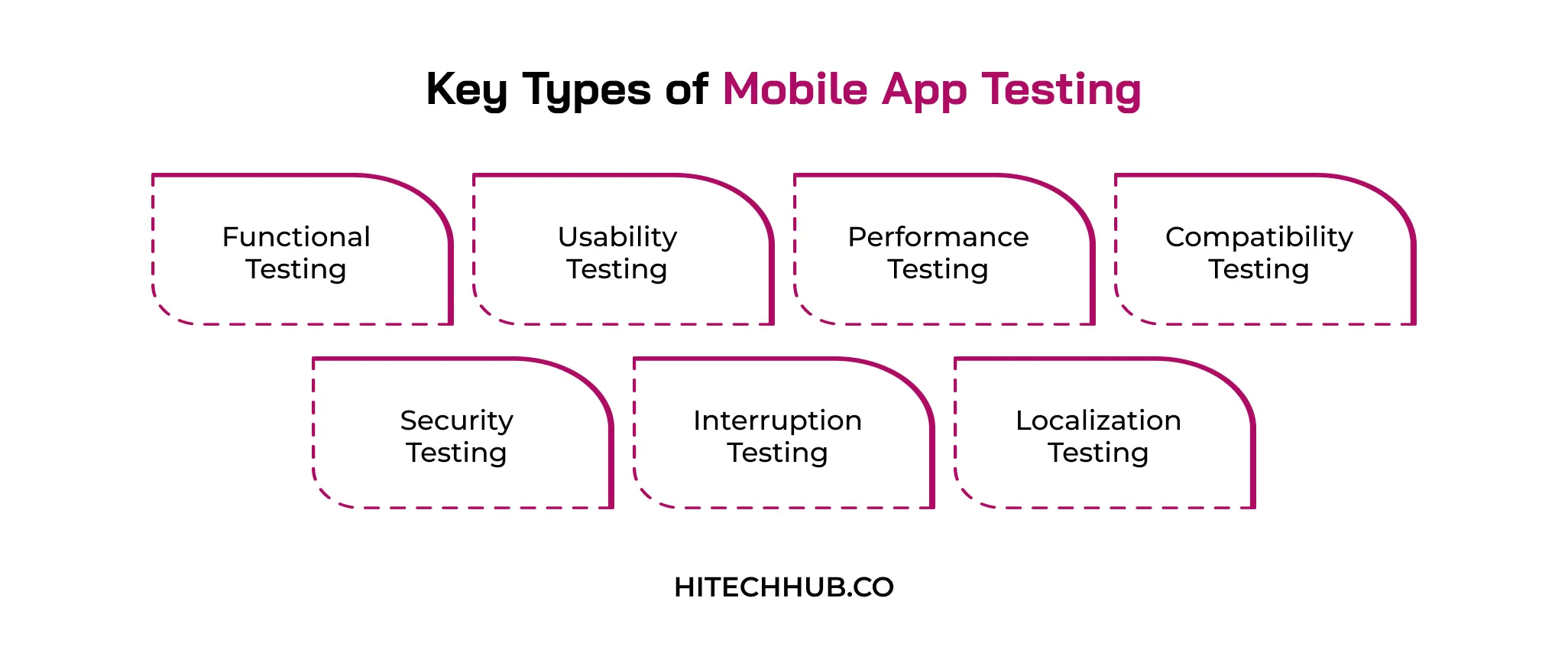
Now, in this section, we will deeply study major types of mobile app testing strategies that experts follow. From functional and security to localization testing, here you are going to explore important facts about them.
1. Functional Testing
Functional testing validates each function of the app, whether it is login flows or in-app purchases, to behave as expected. Additionally, it checks that the app satisfies business requirements and creates a bug-free base before testing begins.
2. Usability Testing
Mobile app usability testing assesses whether the app feels intuitive and comfortable to real users by examining navigation, layout, and the overall user experience. It helps identify confusing workflows or design friction points that could drive users to quit the app.
3. Performance Testing
This testing method helps in evaluating the speed, responsiveness, and stability of the mobile application under different load situations and conditions. Additionally, mobile app performance testing guarantees that the app remains stable and responsive in extreme traffic, usage, or resource starvation.
4. Compatibility Testing
Mobile app compatibility testing is the process of verifying that a native or hybrid mobile app can work on various devices, screen sizes, operating systems, and OS versions. This testing method is required to identify device-specific bugs ahead of real users across a fragmented mobile ecosystem.
5. Security Testing
Mobile app security testing detects system weaknesses in data storage, authentication, data disclosure, and exposure to cyber-attacks or breaches. It helps to safeguard users’ sensitive data and ensure that it is secure in line with privacy standards like GDPR and CCPA.
6. Interruption Testing
Interruption testing checks the app’s stability during actual disruptions such as notifications, calls, switching to another app, low battery, and many others. This test confirms the app’s resilience without crashing or losing user data in case such interruptions occur.
7. Localization Testing
The goal of this testing is to test whether the language, currency, date and time, and local content are accurate for every region included in the release. Localization testing is used to verify the same customer experience in other countries and languages.
Manual vs. Automated Mobile App Testing
Choosing manual vs. automated mobile testing depends on various business requirements, such as quick market release or full-scale UI control. Here, we will first understand these two approaches separately and then look at their differences based on multiple criteria.
1. Quick Definitions
Manual Testing: This is a process where human testers manually test cases without the need for scripts or automation tools, using a process of observation, intuition, and real user judgment. Manual testing is especially useful in exploratory, usability, and ad hoc testing, as it can detect visual bugs, user flow errors, and issues in user experience that scripts won’t catch.
Automated Testing: It depends on scripts and testing tools that run predefined test cases multiple times without any user interaction. It is ideal for regression and repetitive functional testing methods because high-volume execution of tests across various devices is much faster and more reliable than that achievable through manual testing.
2. A Detailed Comparison
The choice between manual and automated testing approaches may affect the time to develop an app for business investors. In this section, we are focusing on different criteria based on which both processes are assessed. The following table discusses 5 major parameters with a specific use case for each.
| Criteria | Manual Testing | Automated Testing |
| Speed | Slower execution since testers manually perform each test case | Faster execution as scripts run tests without human intervention |
| Cost | Lower upfront cost but higher long-term cost for repeated cycles | Higher initial setup cost but cheaper for long-term repeated testing |
| Accuracy | Prone to human error during repetitive or lengthy testing sessions | Highly consistent results since scripts execute identical steps precisely |
| Best Use Case | Ideal for exploratory, usability, and ad hoc testing scenarios | Ideal for regression, load, and repetitive functional testing tasks |
| Reusability | Test cases require manual repetition for every new testing cycle | Scripts are reusable across multiple builds and testing cycles |
| Skill Requirement | Requires testers with strong domain and usability testing knowledge | Requires testers skilled in scripting and automation tool frameworks |
Popular Mobile App Testing Tools & Frameworks
Whether you are developing an Android, iOS, or cross-platform app, it is crucial to know various mobile app testing tools. This section discusses some of the most important tools that help in testing different types of mobile apps.
1. Tools for Android Testing
For Android app testing, the following tools and technologies are used by experts to ensure a seamless user experience and security.
Espresso: Google’s native testing framework for writing concise, reliable UI tests directly within Android Studio for functional validation.
UI Automator: Enables testing across multiple apps and system UI interactions, ideal for cross-app functional and integration testing scenarios.
Robolectric: Allows developers to run Android unit tests directly on the JVM without needing an emulator or physical device.
Android Debug Bridge (ADB): A versatile command-line tool for debugging, installing apps, and inspecting device logs during testing.
Firebase Test Lab: A cloud-based platform that runs automated tests across a wide range of real Android devices and configurations.
2. Tools for iOS Testing
In iOS app testing, TestFlight and XCTest are crucial tools that a tech stack for mobile app development includes for automation, beta distribution, and performance analysis.
XCTest: Apple’s built-in testing framework integrated with Xcode, supporting unit, performance, and UI testing for iOS applications.
XCUITest: Built on XCTest, this framework specializes in automating UI interactions and validating user flows within iOS apps.
Appium for iOS: An open-source tool enabling automated testing of native, hybrid, and mobile web iOS applications.
TestFlight: Apple’s official platform for distributing beta builds to real users and collecting structured pre-launch feedback.
Instruments: Xcode’s built-in profiling tool for analyzing app performance, memory usage, and identifying bottlenecks during testing.
3. Cross-Platform Testing Tools
Appium, Perfecto, and BrowserStack are the major cross-platform app testing tools, which extend support for app performance and speed.
Appium: An open-source framework for automating tests across Android and iOS, allowing teams to reuse test logic across platforms where appropriate.
BrowserStack: A cloud-based platform offering real device access for compatibility and functional testing across thousands of configurations.
Sauce Labs: Provides scalable cloud infrastructure for running automated and manual tests across various devices, browsers, and OS versions.
Katalon Studio: A comprehensive automation tool supporting mobile, web, and API testing with low-code and scripting capabilities.
Perfecto: A cloud-based continuous testing platform enabling functional, performance, and visual testing across real mobile devices.
A Step-by-Step Mobile App Testing Process
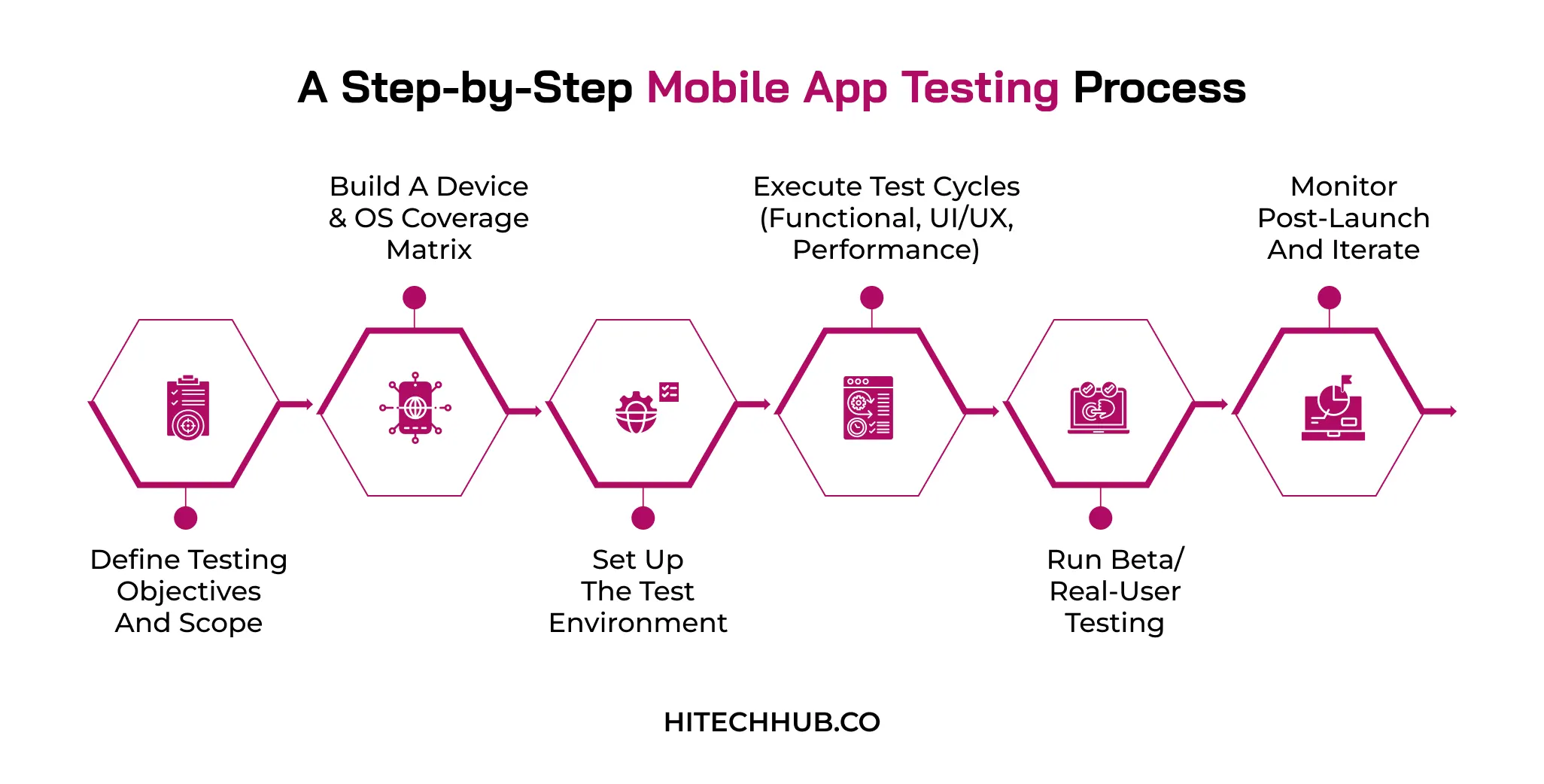
To analyze technical issues and report them, a dedicated mobile app testing process is used by experts. Here, you are going to study key testing stages, from defining app objectives to post-launch support.
1. Define Testing Objectives and Scope
This refers to capturing which features should be tested, which ones are the most important, and how the app should work when it passes the test. Setting out a mobile app testing checklist is essential to make sure that the teams are not wasting time and effort on low-impact areas.
- It helps to identify critical user journeys that directly impact revenue and retention
- Set measurable benchmarks like crash rate and load time targets
2. Build a Device & OS Coverage Matrix
Testing teams should choose operating systems, OS versions, and screen sizes for iOS or Android app development based on the app’s target audience, market distribution, and actual usage data. A comprehensive matrix will help to determine the most important device configurations for an app’s audience and users.
- Analyze app store analytics to rank devices by active user share
- Include upcoming OS betas to catch compatibility issues before public release
| Device Category | OS Version | Screen Size | Priority |
| Flagship Smartphones | Android 15, iOS 18 | 6.1″ – 6.9″ | High |
| Budget/Entry-Level Smartphones | Android 13, Android 14 | 5.5″ – 6.3″ | High |
| Tablets | iPadOS 18, Android 14 | 8″ – 12.9″ | Medium |
| Older/Legacy Devices | Android 11, iOS 15 | 5.0″ – 6.0″ | Medium |
| Foldable Devices | Android 15, One UI 7 | 6.2″ (folded) – 7.6″ (unfolded) | Low |
| Wearables (Smartwatches) | Wear OS 5, watchOS 11 | 1.2″ – 1.9″ | Low |
3. Set Up the Test Environment
This phase is about setting up the tools, emulator, real devices, and testing frameworks on which the test cases will be tested. A properly set up environment ensures consistent results across manual and automated testing efforts.
- Configure staging servers that mirror production data and API behavior
- Integrate version control and test management tools for streamlined collaboration
4. Execute Test Cycles (Functional, UI/UX, Performance)
In this phase, test cycles are executed that incorporate functional, design, and performance testing to identify problems across every layer of the app. Each test cycle builds on the previous one, validating the app’s readiness for real users.
- Log defects with severity levels to guide developer prioritization efficiently
- Re-test fixed bugs immediately to confirm resolution before moving forward
5. Run Beta/Real-User Testing
This phase is about launching the mobile application to a limited user group to understand how real people are experiencing it before a fully-fledged launch. It helps to identify various usability issues and edge cases that are ignored by experts.
- Distribute builds through TestFlight or Play Console for controlled rollouts
- It collects structured feedback using in-app surveys and crash analytics tools
6. Monitor Post-Launch and Iterate
This stage helps to monitor the app for performance errors, crash reports, and user feedback once it has been released to find new issues. This allows teams to provide regular updates and further enhancement of the app based on observations.
- This helps to set up real-time alerts for spikes in crashes or negative reviews
- Schedule regular update cycles based on prioritized user-reported issues
Common Mobile App Testing Challenges
While performing mobile application testing, businesses may experience several challenges, such as device fragmentation and network variability. In mobile app development, it is crucial to address these parameters and apply various methods to overcome them. Here is a table that describes major challenges with their respective solutions.
| Challenge | Description | Solution |
| Device Fragmentation | Thousands of device, screen, and OS combinations exist across platforms. | Prioritize high-usage devices using analytics and real-world market data. |
| OS Version Compatibility | Frequent Android and iOS updates break existing app functionality quickly. | Maintain a rolling test matrix covering the latest three OS versions. |
| Network Variability | Apps must perform reliably across 5G, 4G, Wi-Fi, and offline modes. | Simulate varying network conditions using throttling and connectivity testing tools. |
| Limited Testing Time | Agile release cycles leave minimal time for thorough testing coverage. | Automate repetitive test cases to speed up regression testing cycles. |
| Real Device vs. Emulator Gaps | Emulators miss hardware-specific bugs that only appear on real devices. | Combine emulator testing with cloud-based real device testing platforms. |
Best Practices for a Winning Mobile App Testing Strategy
For implementing mobile app testing strategies successfully, it is important to create a balance between automation speed and real-world validation. A standardized testing approach helps teams to identify device fragmentation, fluctuating networks, and abrupt user interruptions.
Developing an MVP for mobile apps allows businesses to validate core user flows and identify which testing methods are most important for the product. Let’s discover some of the best practices in this section.
Balanced Mobile Test Pyramid: This prioritizes unit and integration tests over UI to keep testing methods fast and maintainable.
Strategic Device Allocation: It focuses on high-usage mobile devices and OS versions based on real-time data analytics.
Test Mobile–Only Realities: Validate app behavior during interruptions, offline states, and varying network conditions users actually face.
Optimize CI/CD Automation & Reporting: The method integrates automated tests into pipelines with clear, actionable reporting for faster bug detection.
Safe Transition to Production: It uses staged rollouts and feature flags to minimize risk before full-scale app deployment.
How to Choose the Right Mobile App Testing Agency
Whether you develop an iOS app, Android solution, or hybrid platform, it is highly recommended to approach a reliable and experienced mobile app testing agency. Here is a practical process that is generally adopted by product teams when selecting a specialized mobile app testing agency.
Evaluate Industry Experience: Review the agency’s past projects, client testimonials, and experience testing apps similar to your industry and complexity.
Assess Technical Expertise: Check whether the agency uses modern automation frameworks, real device labs, and testing tools relevant to your app’s tech stack.
Verify Device and OS Coverage: Confirm the agency can test across your target devices, operating systems, and screen sizes to ensure comprehensive compatibility coverage.
Review Communication Practices: Choose an agency that provides clear bug reports, regular progress updates, and transparent communication throughout the testing process.
Compare Pricing and Time: Consider cost structures and delivery timelines to ensure the agency fits your budget without compromising testing quality or thoroughness.
Conclusion
Strong mobile app testing strategies are no longer optional because they are the foundation of every successful app launch. Be it functional, usability, security, or localization testing, all of these are important for delivering a reliable, high-performing product. It is beneficial to combine manual and automated testing, create a strong device coverage matrix, and work with the right testing experts.
This helps to catch bugs before they go to the customer and build trust with them. Investing in these effective methods today ensures long-term app success and stronger returns. Connect with Hitech Hub to find the right app development companies in the USA that perform rigorous testing and security checks.
Frequently Asked Questions (FAQs)
- What is the difference between mobile app testing and mobile app QA?
The mobile app QA process helps to prevent bugs, whereas testing strategies detect system errors and validate features. Quality assurance is applied to the entire development lifecycle, but testing is performed at the execution phase. QA is a proactive approach that helps in setting workflow metrics, and testing is a reactive approach that reports technical flaws.
- Should I use real devices or emulators for mobile app testing?
Virtual simulators are used for rapid UI checks and CI/CD automation, whereas real devices are suitable for beta testing and security checks. Businesses should utilize a combination of both virtual testing environments and physical hardware throughout the QA lifecycle. It is crucial to run functional checks, scale automated testing scripts, and validate the package.
- Is automated testing necessary for a small or MVP app?
Automated testing may be crucial for an MVP, as it mainly focuses on core logic that prevents critical failures. Manual and ad hoc testing methods are more flexible and cost-effective for early-stage mobile applications. Faster market reach and validating demand are more important than code perfection at the MVP stage, ensuring manual processes.
- How to handle fragmentation in different mobile app testing strategies?
Device fragmentation depends on operating system versions, screen sizes, hardware capabilities, and manufacturer-specific OEMs like Samsung’s One UI. To handle this, device coverage, an optimized tooling mix, and a tiered execution cycle should be balanced. Additionally, businesses must use agnostic frameworks, automate UI layout checks, and perform crash analysis.

Eshika Jain
02-October-2026
Top Categories

NEED HELP SELECTING A COMPANY?
With the fast-paced world of web development today, keeping pace.
Connect With Us